Agent Sessions
Agent sessions are opt-in in this release. Enable them under Settings → Experimental → Agent sessions.
LaraEnv can run installed Claude Code, Codex, Kimi, and OpenCode CLIs inside the existing Terminal Workspace. Sessions are organized as project → working copy → session, while their terminals stay open as ordinary tabs.
Start a session
Open Terminal, expand the Agents navigator, and select New. Search for a project, choose an installed provider, then choose where it should run.
You can also use the Command Center: type a project and provider, such as cotesaude claude, cotesaude codex, or acme kimi. This quick action starts in the current checkout; use the full launcher when you want a branch or worktree.
LaraEnv detects providers from their local command-line executables and displays the installed version. It does not install, authenticate, or bypass the security controls of those tools.
Choose the working copy
The choice is explicit on every launch:
- Current checkout — the default. Runs in the project folder exactly as it is and performs no Git or routing change.
- Switch main checkout — switches the project's existing folder to a branch you select. LaraEnv refuses unsafe switches when the checkout is dirty or is shared by another live agent.
- Isolated worktree — creates or reuses a separate checkout under LaraEnv's managed worktree directory. This is optional, not a requirement for using agents.
Multiple agents in the current checkout share the same files. LaraEnv warns when another live session already uses that checkout, but you decide whether to continue.
Domains and worktrees
Creating a worktree does not change Nginx, the Windows hosts file, or the main project URL automatically. If a worktree needs to serve the app, choose one of these separately:
- Keep the canonical project domain on the main checkout.
- Explicitly assign the canonical domain to the worktree.
- Create a separate editable preview hostname for the worktree.
For proxied Node/Vite applications, a worktree preview also needs its own port so the main and isolated servers do not collide. LaraEnv validates routing changes and can restore the canonical domain to the main checkout.
Manage sessions
The collapsible navigator separates Active, Recent, and Archived sessions and supports text search. From a session you can focus its tab, rename it, stop it, archive its LaraEnv metadata, and resume it when the provider has a verified conversation identifier.
Closing the navigator does not stop any terminal. Session metadata is stored separately from provider-owned conversation history.
Agent map
With Agent sessions enabled, the bottom status strip includes an activity counter for the selected eligible agent terminal while its observation is active. Open it to view the Agent map, or choose View map from a session's menu. The counter hides when no eligible terminal is selected or observation ends; maps of retained sessions remain available from their menus. Opening the map does not launch another agent or switch its terminal.
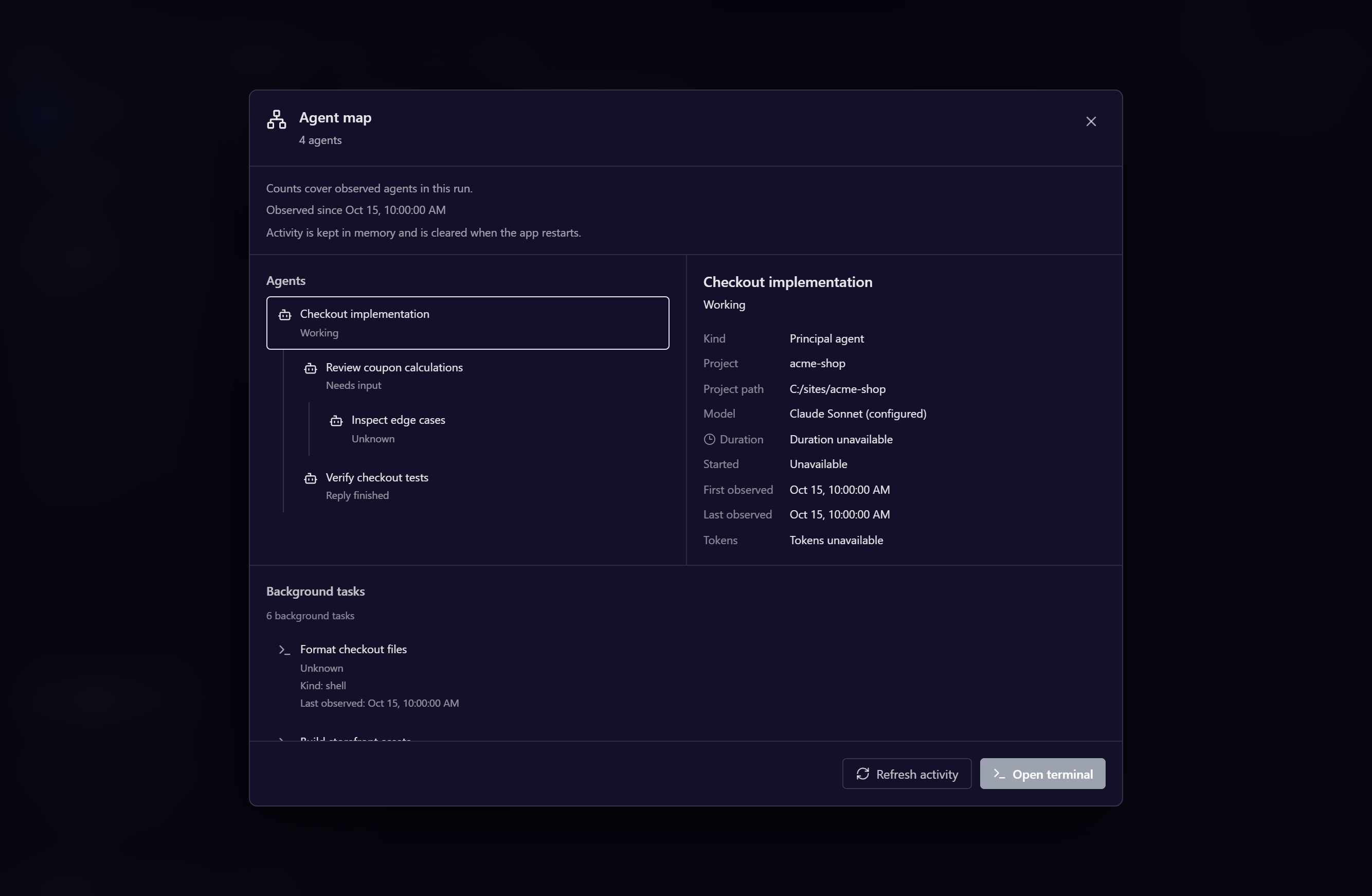
The map shows the main agent and observed descendants for supported Claude Code and Codex versions. Select an agent to inspect the available state, observation time, and optional model or timing information. Open terminal returns to the main session's terminal. Background tasks appear separately when the provider supplies a supported inventory; they are not included in the agent count.
Main and detached LaraEnv windows share the backend observations while keeping their own selection. The map stays on the session you opened until you close it, even if the active terminal changes.
The map reports what the local provider can confirm. Unknown, partial, unavailable, and stale observations are identified; a missing event or process does not prove successful completion. A completed response describes that observed turn, not permanent termination of the agent. The footer's working count includes confirmed active states, while retained agents can remain in the total after their activity stops.
Activity is kept in memory for the current application run, with bounded retention. Restarting LaraEnv does not restore a persistent history of descendants. Provider support varies; Kimi and OpenCode can show the main session without supported descendant observation. The map does not read conversation transcripts, control individual children, or infer per-agent tokens from account usage limits.
Restoration and usage
- Live terminal layouts are persisted across navigation and application restarts.
- Cold conversation resume is provider-dependent. LaraEnv validates the provider's local metadata before offering resume; if it is missing or stale, start a fresh session instead.
- The bottom status strip displays usage only when LaraEnv has a supported local reader. Unsupported, unavailable, stale, or signed-out states are identified instead of estimated.
Current limitations
- Agent tabs cannot be detached into a second LaraEnv process yet. Local, project, and SSH tabs keep their normal detach support.
- Provider capabilities vary by installed version, especially resume and usage reporting.
- Notifications are kept in LaraEnv's in-app inbox. Native Windows toast delivery is temporarily unavailable while it is redesigned for signed builds.
- Do not disable or reset the experimental feature while live agents or managed worktree dev servers are running; LaraEnv blocks this to avoid orphaning resources.